Pro feature
The reminders you used to send yourself
Pro sends the roster out for you: the schedule to the whole team on the day you choose, and a reminder to each person before their own date. You stop being the one who texts everybody on Thursday night.

Thursday night, again
Ngaio runs the Hillcrest Primary P&C’s Friday canteen roster. Every Thursday night she copies the names from the spreadsheet, texts each parent “just a reminder you’re on canteen tomorrow, 11:15–1:30”, and answers the replies until ten. It works, mostly. It also means she can’t go away for a week without the canteen falling over.
Roster emails do that job. Set them up once in Settings and they go out on their own.
Two kinds of email
The whole schedule
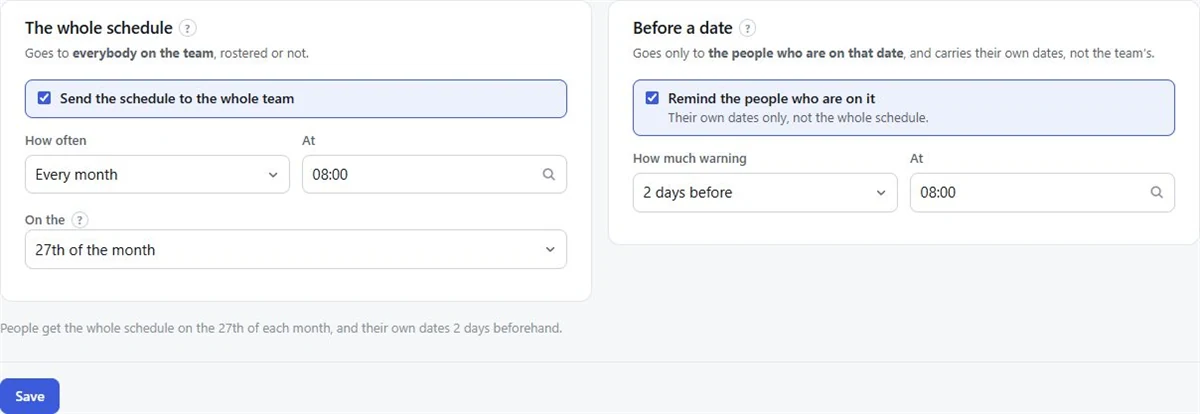
The team’s schedule for the period, sent to everybody on the team: Every week, Every fortnight or Every month, on the day you choose. It also tells each person which of the team’s dates they’re marked away on.
Before a date
A reminder to each person about their own date only, not the whole schedule. Choose how much warning, 1 to 6 days, and the time it goes.
Each reminder carries the reply buttons, so people can say I can do it or I can’t make it without signing in. When someone can’t make it, the moderators get an email.
Setting it up
- 01
Open Settings
In your organisation, go to Settings and the Notifications tab.
- 02
Turn them on
Press Turn notifications on.
- 03
The whole schedule
Tick Send the schedule to the whole team and choose how often and on which day.
- 04
Before a date
Tick the reminder, choose How much warning and the time.
- 05
Save
A line under the form says in plain words what will be sent and when.
Who gets them
Roster emails go to people who have accepted their invitation. Until someone accepts, their address gets exactly one email from FairTurns: the invitation. People added by name only get no email at all, so keep printing the roster for them. Replies to a FairTurns email go to whoever made the roster.
Sign-in codes, invitations and password resets are separate account emails and are sent on Free and Pro alike.
A few tips
- Two days’ warning suits most volunteer rosters: enough time to find cover, close enough to remember.
- Send the schedule on a quiet day, such as a Sunday afternoon for a weekend roster, so people see it when they plan their week.
- Monthly schedules work for groups who are on once a month or less.
What Pro costs
Pro is A$1 a month per organisation, paid 1 to 5 years at a time (A$12 to A$60), GST included in Australia. Paid by card. It renews for the same length unless you switch renewal off, with emails 30 and 7 days before. If it isn’t renewed, the organisation goes back to Free and keeps everything. See pricing.
Questions
Can FairTurns send roster reminder emails?
Yes, on Pro. It can email the schedule to the whole team every week, fortnight or month, and send each person a reminder 1 to 6 days before their date.
Do reminders go by text message?
Reminders go by email, with buttons to reply. The public roster link also works on any phone without signing in.
Who receives roster emails?
People who have accepted an invitation to the organisation. People added by name only are not emailed.
What does Pro cost?
A$1 a month per organisation, paid 1 to 5 years at a time, A$12 to A$60. It covers every team and person in the organisation.
Read next
Replies
People answer “I can do it” or “I can’t make it” straight from the email. Pro.
Roster reminder messages
Reminder messages to copy for volunteers, canteen helpers, staff and housemates, and when to send them.
P&C, PTA and parent associations
Uniform shop, fete stalls, discos and working bees: every P&C roster in one place, on one link.
Make your roster free
Click a day, add people, share one link. No card, no limit on people or dates.