Free feature
When the team changes, share the roster out again
Someone moves away, two new people join, and the roster you made in February no longer fits. Redistribute hands out the places, moves as few people as it can, and shows you exactly who gains or loses a date before anything changes.

The roster was fine until March
Harbour Physio’s front desk has five people covering Saturday mornings, filled through to June. Then Kofi takes a job in Perth, and Yuki and Hamish start the same week. You could go through every Saturday by hand, crossing Kofi out and slotting the two new people in, and try to remember who already had extra. Or you can press one button.
Redistribute is built for exactly that moment: the team is different now, and the roster should reflect the new team without starting again from scratch.
What it does
- Takes off anyone you untick. Kofi’s Saturdays go back into the pool.
- Hands those places out to the people still on the team, fewest turns first.
- Shares the rest out again, so new people pick up dates from those who had the most.
- Moves as few people as it can. Someone whose Saturday doesn’t need to change keeps it.
- Respects the rules Fill uses: away days, who is set up for which position, and no clashes across your teams.
Nothing changes until you say so
Before it touches the roster, Redistribute shows a confirmation page. It names every person who gains a date and every person who loses one, and how many. If some places were set by hand, it asks whether to keep them as they are. Only when you confirm does anything move.
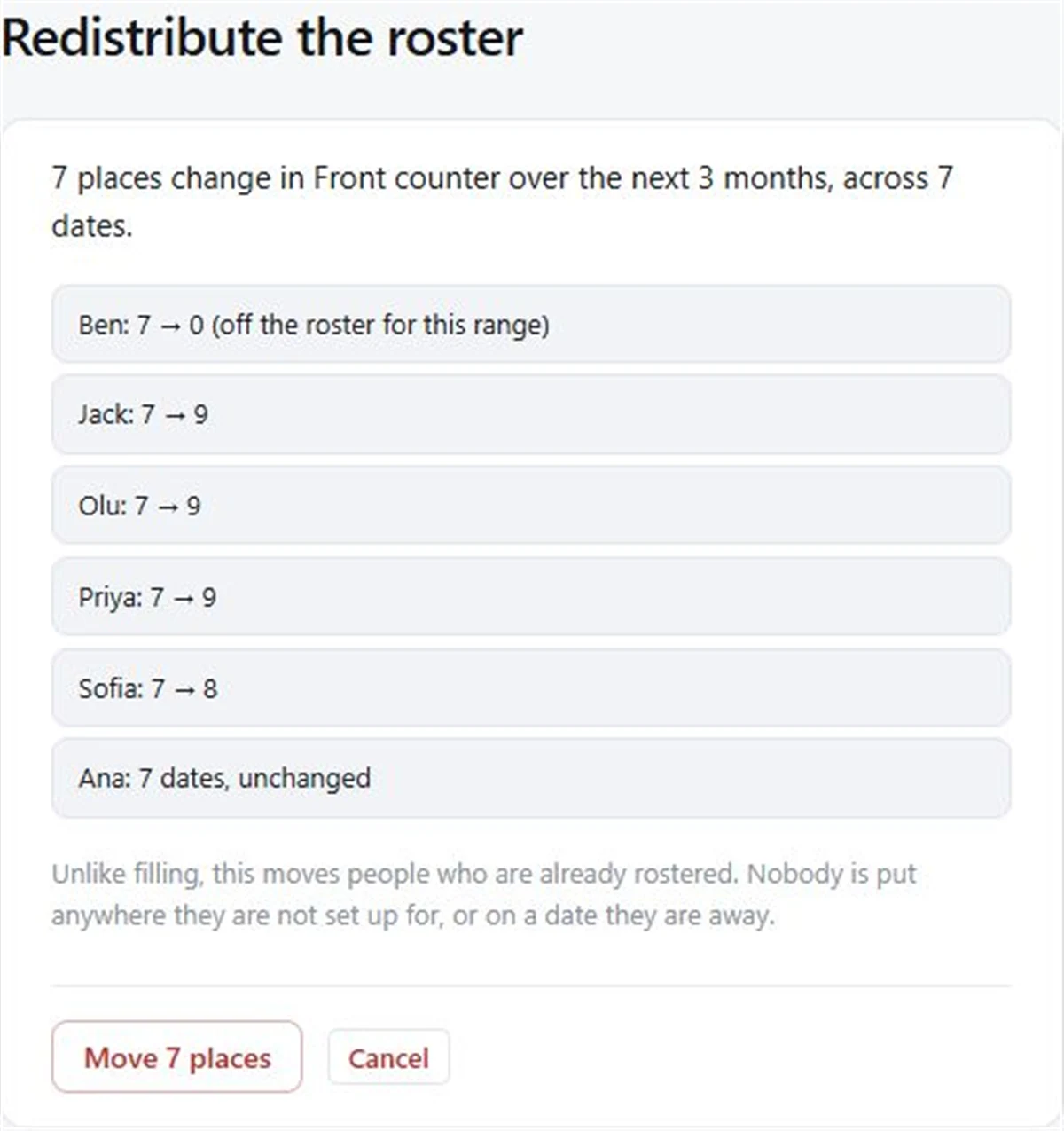
That page is also handy to screenshot for the group chat: “Here’s what’s changing now Kofi’s gone.”
Step by step
- 01
Add the new people
Add Yuki and Hamish to the team, by email or by name.
- 02
Open Fill
In the team, go to Fill and choose how far ahead under How far ahead.
- 03
Untick who is leaving
Under Who to use, untick Kofi. Leave everyone staying ticked.
- 04
Press Redistribute
Read the confirmation page: who gains, who loses, what is kept.
- 05
Confirm
The roster updates. Check the Turns booked chart beside Fill.
Good to know
- Redistribute only works inside the range you choose, so past dates stay as a record of who was actually on.
- Unticking someone applies to that one run. They stay on the team, and next time the page starts with everyone ticked.
- People who lose a date aren’t emailed about it on Free; share the public link so they can see the new roster. With Pro roster emails, the next schedule email shows their dates.
Redistribute is free, along with Fill and Clear the range.
Questions
How do I change a roster when someone leaves?
Untick them under Who to use on the Fill page and press Redistribute. Their places are handed out, the rest are shared again, and you see every change before confirming.
Will it reshuffle everybody?
It moves as few people as it can. Most people keep the dates they already had; the changes are listed on the confirmation page.
What about the places I set by hand?
It asks. You can keep places set by hand as they are, or let them be shared out with the rest.
Can I add a new person to a full roster?
Yes. Add them to the team and press Redistribute. They pick up dates from the people who had the most.
Read next
Fair fill
One button puts people into every empty place, fewest turns first. Free.
Redistribute
Use Redistribute when someone joins, leaves or takes a break: FairTurns hands out their places and shares the rest out again, showing every change first.
When someone can’t make it
What to do when someone drops out of a shift: who to ask, what to say, and how to stop it every week.
Make your roster free
Click a day, add people, share one link. No card, no limit on people or dates.