Redistribute
Share an already-full roster out again when somebody joins, leaves or takes a break, and see every change before it happens.
Help topics
Start
Create an organisationAdd your first teamAdd peopleThe join linkAdministrators, moderators and membersDates
Add a dateRepeating datesChange or cancel one dateKeep dates aheadPositions
Positions and headcountsWho can do whatFilling the roster
Fill empty placesRedistributeClear the rangeSame person all dayReading Turns bookedSharing
The public rosterYour next datesAway days
Mark yourself awayAway for a stretchAway regularlyAway days for people without an accountPro
What Pro addsReplying to a dateRoster emailsHow oftenBuying and renewing ProYour account
Sign-in codesChange your emailStop invitationsWhen something goes wrong
Didn’t get an emailA link has expiredTake back an answerWhen to use it
The Thornbury Community Garden watering roster is full until June. Then Mei joins, and Hamish is away on a long break. Fill empty places can’t help, because there are no empty places and Fill never moves anyone. Redistribute is for exactly this.
It takes off anyone you untick, hands their places out, and shares the rest out again, moving as few people as it can.
Run it
- Open the team and press the Fill tab.
- Choose How far ahead: the next 1, 3, 6, 9 or 12 months, starting today.
- If the team has positions, choose one under Which position, or leave Every position.
- Under Who to use, make sure the newcomer is ticked and untick anyone leaving or taking a break.
- Press Redistribute.
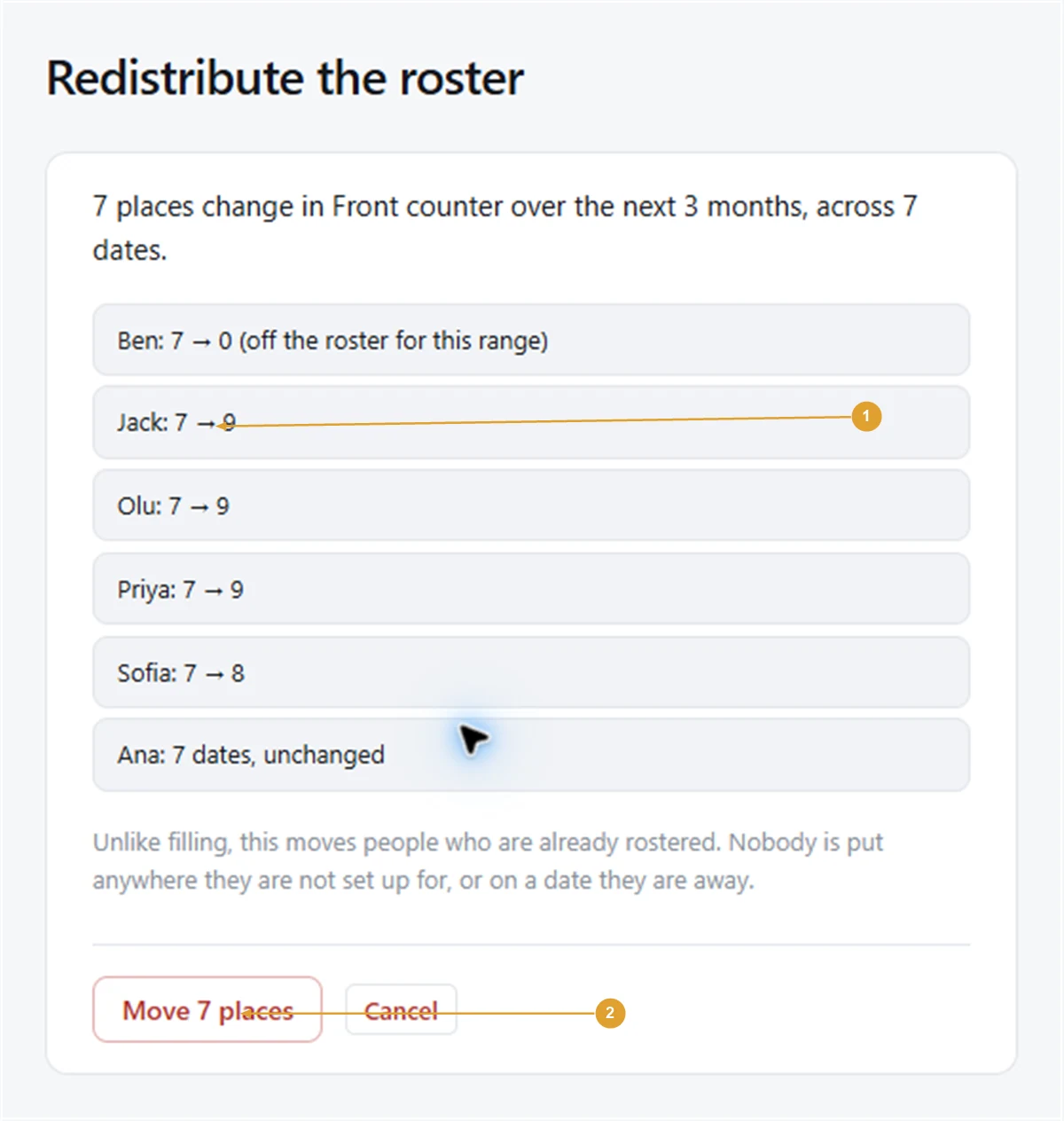
Nothing changes yet. A page called Redistribute the roster says how many places change across how many dates, then lists every person with their dates before and after, such as “Hamish: 6 → 0 (off the roster for this range)” and “Mei: 0 → 3”.
- Read the list. If it isn’t what you want, press Cancel.
- If some places were set by hand, choose Keep them as they are or Let this change them too.
- Press the button that says how many places will move, such as Move 9 places.
Note: Unlike Fill, Redistribute moves people who are already on dates. It still never puts anyone on a position they aren’t set up for, on a day they are away, or in two places at overlapping times in your organisation. With Pro, dates someone has said “I can do it” to are left alone.
Good to know
- The ticks are for this run only. Next time you open the Fill tab, everybody is ticked again, so nobody is quietly left out for months.
- The confirmation shows people moving between dates in the range. Past dates are never touched.
- If the people ticked can’t cover every place, the confirmation says how many will stay empty.
- Someone leaving altogether can also be taken off the team from its People tab, which offers to empty their upcoming places. Redistribute then shares those out.
Check the result in Turns booked beside the Fill controls. To undo a fill entirely instead, see Clear the range. More on the Redistribute feature.
Still stuck?
Email info@fairturns.com and say what you were trying to do.