Free feature
Name the jobs, say how many, and choose who can do them
A Saturday at the canteen isn’t “four people”. It’s two on the till, one on the barbecue and one on the urn. Positions let the roster say that, and only put people on the jobs they’re set up for.

Why one list of names isn’t enough
At Eastlake Juniors the barbecue needs someone with a food handling certificate, the till needs two, and the urn needs someone who turns up at 7:45. Put all twelve parents in one pool and sooner or later the person who has never used the barbecue is standing in front of it.
Positions fix that. Each team can have named positions, each with a headcount. “Till, 2 people” makes two till places on every date. People can be limited to the positions they do, and Fill never puts anyone on a job they aren’t set up for.
How it works
Positions
On the team’s Positions page, add a position with a name and how many people it needs each date.
Who can do what
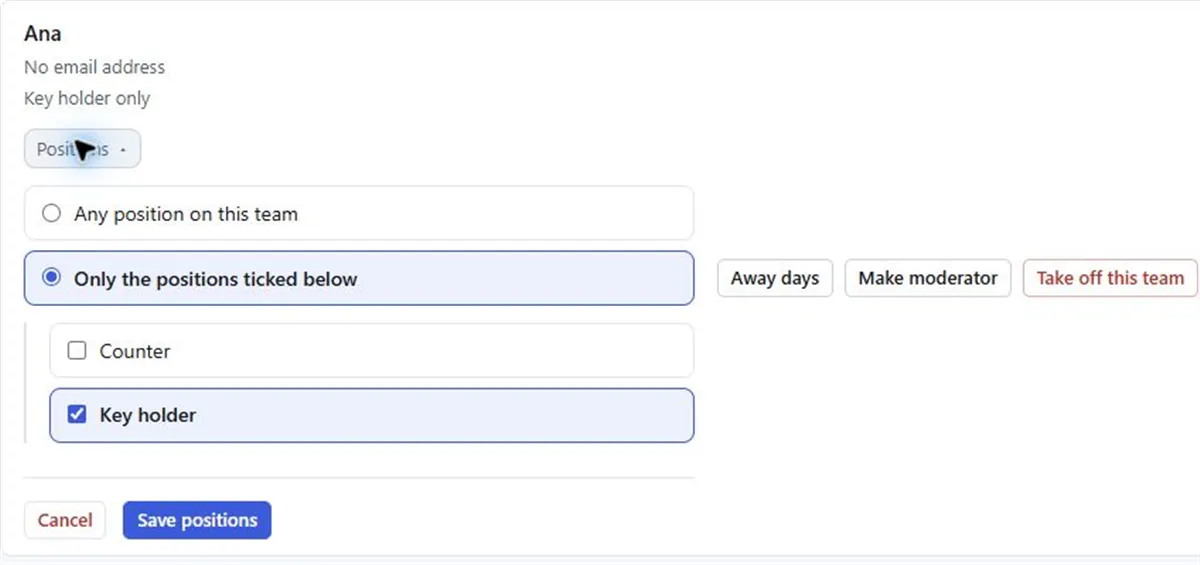
On the team page, set a person to Any position on this team or Only the positions ticked below.
Shared out per position
Turns are counted position by position. Being on the barbecue a lot doesn’t make you next for the till.
No limits set
Someone with no limits can be put on every position.
Setting it up
- 01
Open the team
Go to the team and choose Positions.
- 02
Add each position
Type what it is called, such as Till, and how many people it needs.
- 03
Limit people where needed
On the team page, tick only the positions a person does.
- 04
Fill by position
On the Fill page, choose a position under Which position, or Every position.
Ideas for positions
- Driver and Loader for a food bank pick-up run.
- Lead and Helper when a trainee should always be with someone who knows the ropes.
- Sound, Lights and Slides for a school concert crew.
- Bins, Kitchen and Bathroom for a share house, one person each.
A date holds a name and times. What to do on the day goes in the position name (“Urn, from 7:45”), so the roster says it at a glance.
Positions and headcounts are free, for every team. With Pro, you can also set how often each person is on, position by position.
Questions
Can I make a roster with roles?
Yes. Add positions to a team, each with a headcount, and every date gets that many places for each role. Fill shares out each position separately.
Can someone do more than one position?
Yes. Tick each position they do. Their turns are counted separately for each one.
Will Fill put a beginner on a job they can’t do?
Fill only puts people on positions they are set up for. If someone has no limits set, they can be put on any position.
Can different dates need different numbers?
A position’s headcount applies to every date of the team. If one day needs a bigger crew, set it up as its own team, such as Canteen, finals day, with its own date and headcounts.
Read next
Positions and headcounts
Give a FairTurns team named positions with a headcount each, so every date has the right number of places to fill for each job.
Club canteen and kiosk
Every family takes a canteen shift, the season is mapped out, and one link shows who’s on.
Who can do what
Limit a person to certain positions on a FairTurns team, so Fill, Redistribute and the people lists only put them where they are set up.
Make your roster free
Click a day, add people, share one link. No card, no limit on people or dates.