Who can do what
Limit someone to the positions they can do, so nobody is put on a job they aren’t set up for.
Help topics
Start
Create an organisationAdd your first teamAdd peopleThe join linkAdministrators, moderators and membersDates
Add a dateRepeating datesChange or cancel one dateKeep dates aheadPositions
Positions and headcountsWho can do whatFilling the roster
Fill empty placesRedistributeClear the rangeSame person all dayReading Turns bookedSharing
The public rosterYour next datesAway days
Mark yourself awayAway for a stretchAway regularlyAway days for people without an accountPro
What Pro addsReplying to a dateRoster emailsHow oftenBuying and renewing ProYour account
Sign-in codesChange your emailStop invitationsWhen something goes wrong
Didn’t get an emailA link has expiredTake back an answerSet someone’s positions
At Brookvale Community Radio, anyone can answer phones on the Saturday shift, but only Priya and Tomás are trained on the desk. Once the team has named positions, you can say who does which.
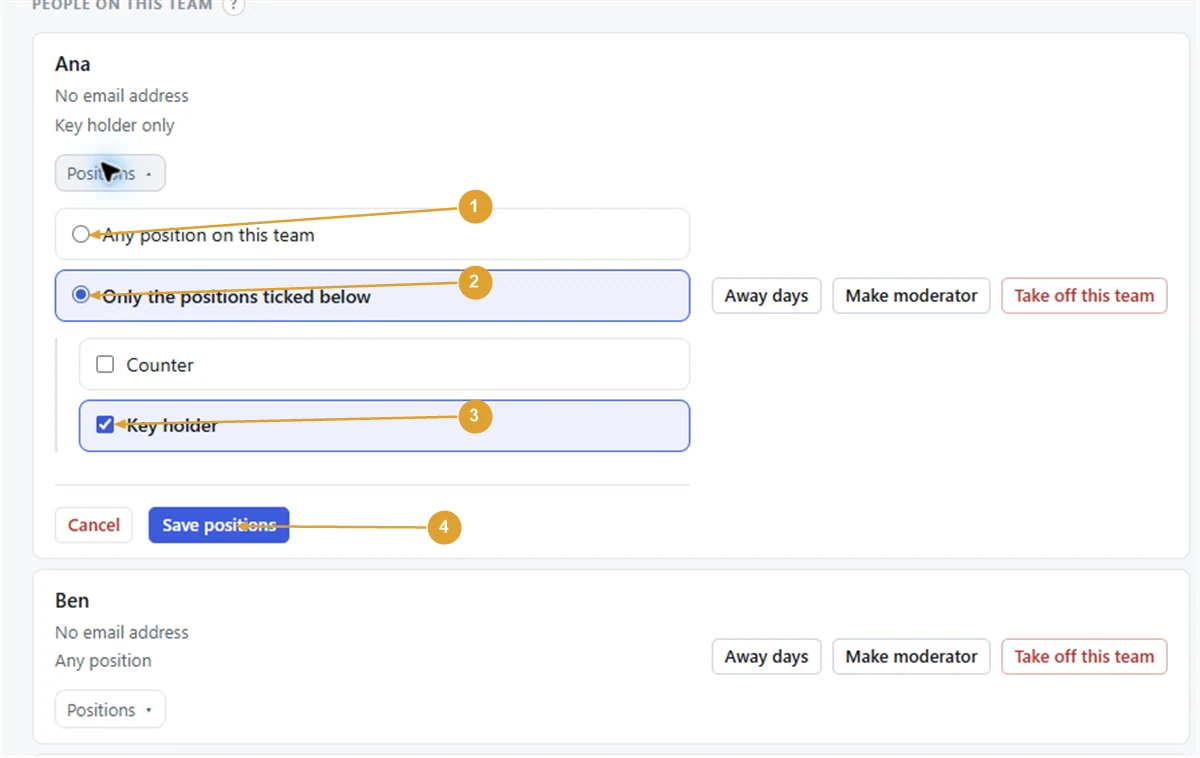
- Open the team and press the People tab.
- Under the person’s name, open Positions.
- Choose Only the positions ticked below.
- Tick the positions they can do, such as Desk and Phones.
- Press Save positions.
Their line on the People tab now reads “Desk, Phones only”. Everybody else still reads Any position, which is the right answer for most people.
To lift the limit, open Positions again, choose Any position on this team and press Save positions.
When you add someone to the team
The Add somebody box on the same tab has Positions (optional). Tick the ones they can do before pressing Add to the team. Tick nothing and they can do any.
What it changes
- Fill empty places, Redistribute and, with Pro, filling by itself only put people where they are set up.
- On the calendar, Change people only lists the people who can do each place.
- On the Fill tab, choosing Which position narrows Who to use to the people set up for it, and says how many others on the team are not.
- With Pro, How often is set position by position, among the people set up for each one.
Note: Changing someone’s positions doesn’t take them off dates they are already on. If Liam is on the desk next Saturday and you limit him to Phones, he stays on that date until you change it with Change people.
If you delete a position
When some people are set up for a position and nothing else, deleting it asks what should happen to them: Leave them on the team (they can then do any position), move them to another position, or Take them off the team. Past dates are kept either way.
The positions setting only appears once the team has named positions. Without them, everybody on the team can be put on every date.
Still stuck?
Email info@fairturns.com and say what you were trying to do.