Away regularly
Mark a day that keeps coming round, like every first Sunday of the month, once instead of every time.
Help topics
Start
Create an organisationAdd your first teamAdd peopleThe join linkAdministrators, moderators and membersDates
Add a dateRepeating datesChange or cancel one dateKeep dates aheadPositions
Positions and headcountsWho can do whatFilling the roster
Fill empty placesRedistributeClear the rangeSame person all dayReading Turns bookedSharing
The public rosterYour next datesAway days
Mark yourself awayAway for a stretchAway regularlyAway days for people without an accountPro
What Pro addsReplying to a dateRoster emailsHow oftenBuying and renewing ProYour account
Sign-in codesChange your emailStop invitationsWhen something goes wrong
Didn’t get an emailA link has expiredTake back an answerSet up the pattern
Hamish plays in a band that has a gig on the first Sunday of every month. He is on the Sunday door roster at the Seaview Surf Club, and he is tired of reminding the organiser. One regular away day takes care of it.
- Open your away days: press Mark yourself away under Your next dates on the calendar, or open your account and press Your away days.
- In the Away regularly box, set A date you are away to one real day it happens, such as Sunday 7 June.
- Press Next. The box now says “Starting Sunday 7 June”.
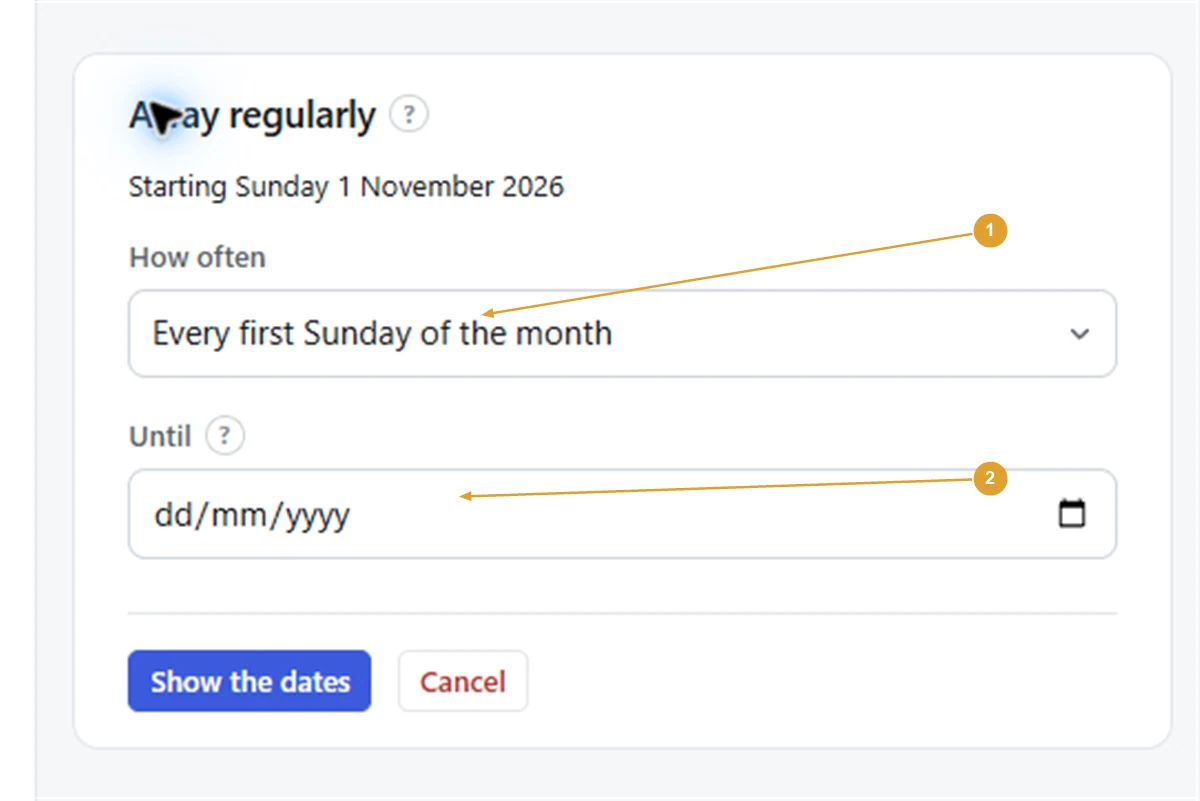
- Choose from How often. The sentences are built from the date you picked, such as Every week on Sunday, Every second Sunday, Every first Sunday of the month or Every 7th of the month.
- Leave Until empty to keep it going, or set a last date, such as the end of the band’s run.
- Press Show the dates.
- A page called Away regularly? shows the sentence and the next few dates it covers, plus any you are already on. If they are right, press Mark away regularly.
The pattern now shows under Your away days, in a section called Regularly, written out in full.
Note: The date you pick decides the choices. To get “every last Friday of the month”, pick a date that is the last Friday of its month. If the sentence you want isn’t offered, cancel and pick a different first date.
Good to know
- You can have up to 10 regular away days.
- Patterns repeat weekly, every second week or monthly, the same way roster dates do.
- As with any away day, you stay on dates you are already on. You see them listed before you confirm, and with Pro you can tick Also tell them I can’t make it for each.
- If you are in more than one organisation, it applies to whatever New marks apply to is set to at the top of the page.
Remove it
Under Regularly, press Remove beside the pattern. Days you marked away one at a time stay marked; only the pattern’s days are freed.
For a one-off, use Mark yourself away. For a holiday, use Away for a stretch.
Still stuck?
Email info@fairturns.com and say what you were trying to do.