Repeating dates
Set up a date that comes round every week, every second week or once a month, so you never type it in again.
Help topics
Start
Create an organisationAdd your first teamAdd peopleThe join linkAdministrators, moderators and membersDates
Add a dateRepeating datesChange or cancel one dateKeep dates aheadPositions
Positions and headcountsWho can do whatFilling the roster
Fill empty placesRedistributeClear the rangeSame person all dayReading Turns bookedSharing
The public rosterYour next datesAway days
Mark yourself awayAway for a stretchAway regularlyAway days for people without an accountPro
What Pro addsReplying to a dateRoster emailsHow oftenBuying and renewing ProYour account
Sign-in codesChange your emailStop invitationsWhen something goes wrong
Didn’t get an emailA link has expiredTake back an answerStart from a real date
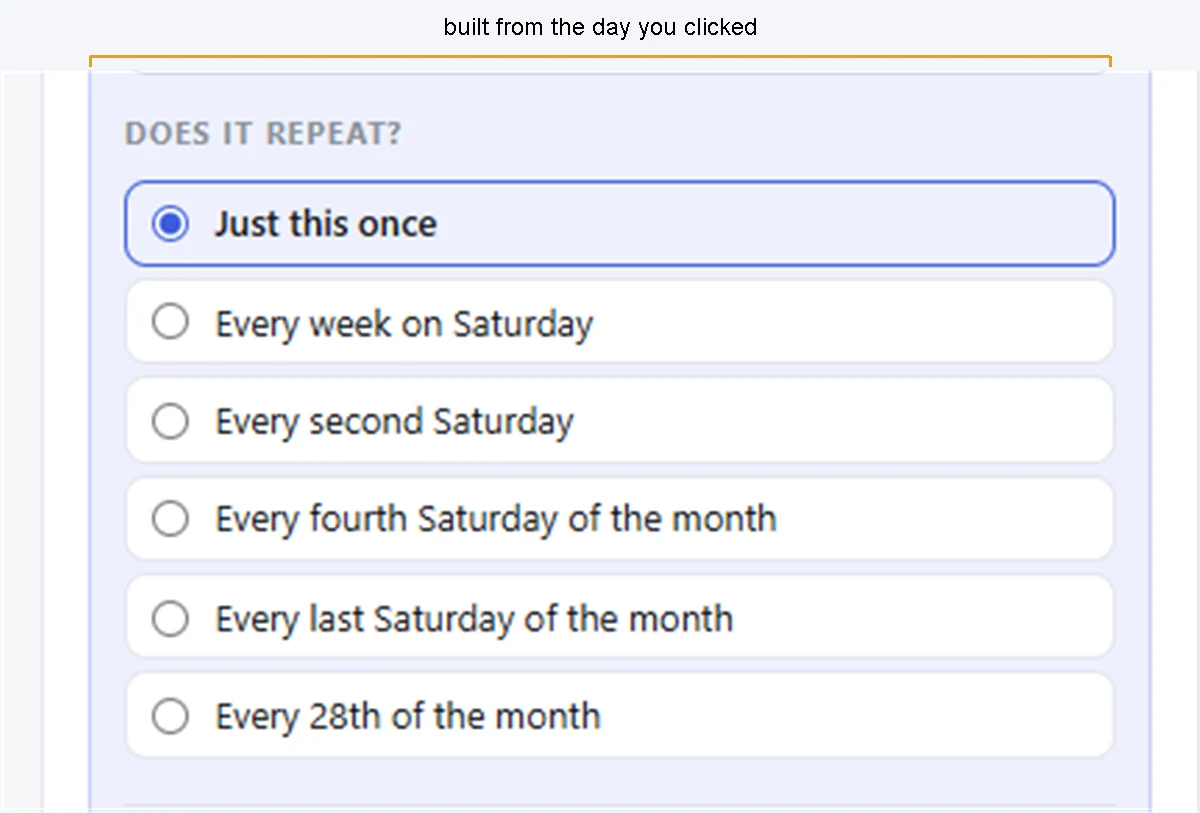
The easiest way is to add the first date on the calendar and say how it repeats. The choices are written as sentences built from the day you clicked, so you see exactly what you are agreeing to.
- Press Home, click the first day it happens, and press Add to this date.
- Choose the Team and set From and To.
- Under Does it repeat?, pick the sentence that fits.
- Press Add to the roster. FairTurns says how many dates are now on the calendar.
For the Glenroy Junior Footy barbecue, clicking Saturday 28 March 2026 offers:
- Just this once
- Every week on Saturday
- Every second Saturday
- Every fourth Saturday of the month
- Every last Saturday of the month
- Every 28th of the month
Which sentences appear depends on the day. “Every last Saturday” only shows when the day you clicked is the last one in its month.
Note: Monthly dates by number stop at the 28th, so nothing quietly skips February. Click the 30th or 31st and you get Every last day of the month instead, when that day is the month’s last.
Or add a schedule directly
Open the team and press the Schedules tab. In New schedule:
- Choose How often: Every week, Every second week, Once a month, on a weekday or Once a month, on a date.
- Choose Which day, plus Which one in the month or Which date for monthly ones.
- Set From and To, and a name under Called if you want one.
- Choose How far ahead to keep dates, and leave Keep it this far ahead ticked.
- Press Add schedule.
What you get
Real dates appear on the calendar straight away, so you can see them and fill them now. The Schedules tab lists each repeat, its times and how many upcoming dates it has. New dates keep coming as old ones pass: see Keep dates ahead.
Repeats are weekly, every second week or monthly. A different rhythm, like four on and four off, isn’t one of the choices; add those dates one at a time instead.
To change the time of one date, or every date, see Change or cancel one date. Changing how often means a different set of dates, so delete the schedule and add it again. More on the repeating dates feature.
Still stuck?
Email info@fairturns.com and say what you were trying to do.