Administrators, moderators and members
Understand the three roles and hand out the right one, so the work is shared without everyone seeing everything.
Help topics
Start
Create an organisationAdd your first teamAdd peopleThe join linkAdministrators, moderators and membersDates
Add a dateRepeating datesChange or cancel one dateKeep dates aheadPositions
Positions and headcountsWho can do whatFilling the roster
Fill empty placesRedistributeClear the rangeSame person all dayReading Turns bookedSharing
The public rosterYour next datesAway days
Mark yourself awayAway for a stretchAway regularlyAway days for people without an accountPro
What Pro addsReplying to a dateRoster emailsHow oftenBuying and renewing ProYour account
Sign-in codesChange your emailStop invitationsWhen something goes wrong
Didn’t get an emailA link has expiredTake back an answerThe three roles
Take Northside Food Hub. Grace, the coordinator, runs the whole organisation. Kofi runs the Thursday packing team and nothing else. The forty volunteers just need to know when they’re on. Those are the three roles.
- Administrator runs the whole organisation. Only administrators see People and Settings in the menu. They add and remove people, create and archive teams, run every team, publish the public roster, switch on the join link and look after Pro.
- Moderator runs one team (or several). For that team they add, change and call off dates, use Fill, Redistribute and Clear the range, set up positions and schedules, change the team’s settings, add people from the organisation to the team, and mark away days for people without an account.
- Member sees the teams they are on and the dates on them, and marks their own away days.
A moderator can’t add people to the organisation, take another moderator off a team or archive a team. Those stay with administrators.
Make someone an administrator
- Press People in the menu.
- Find the person and open Manage under their name.
- Press Make admin, then confirm.
Only someone who has confirmed their email and signed in can be made an administrator, so the button doesn’t show for invited or name-only people. Remove admin in the same place takes it away.
Note: An organisation always keeps at least one administrator. To step down as the last one, make somebody else an administrator first.
Make someone a team moderator
- Open the team (press Teams, then the team’s card).
- Press the People tab. The person has to be on the team already.
- Press Make moderator beside their name, then confirm.
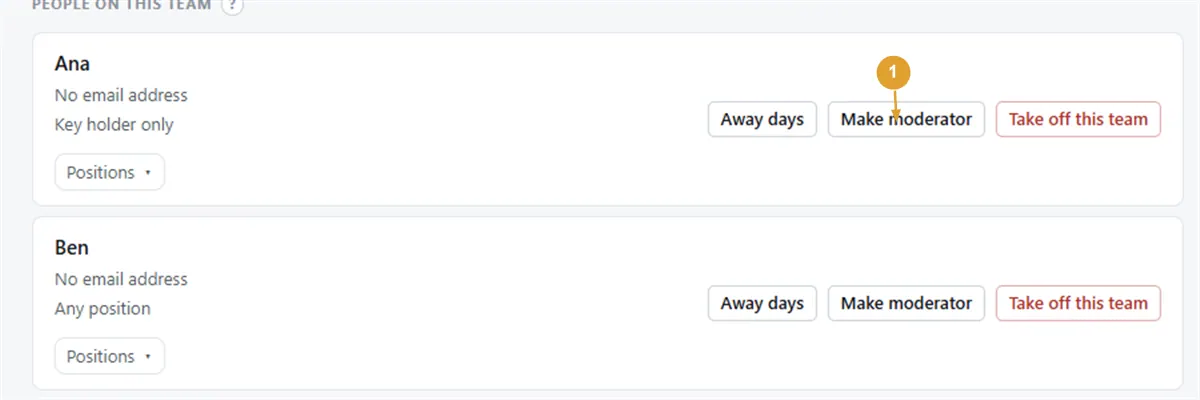
They show a Moderator label on the team. Remove moderator takes it away; they stay on the team and can still be rostered. Only administrators see these buttons.
Moderator is per team. Kofi can moderate Thursday packing and still be an ordinary member on the Saturday delivery run.
Related: Add people, Add your first team and Mark yourself away.
Still stuck?
Email info@fairturns.com and say what you were trying to do.