What Pro adds
See what Pro adds to an organisation, what stays free, and where to switch each part on.
Help topics
Start
Create an organisationAdd your first teamAdd peopleThe join linkAdministrators, moderators and membersDates
Add a dateRepeating datesChange or cancel one dateKeep dates aheadPositions
Positions and headcountsWho can do whatFilling the roster
Fill empty placesRedistributeClear the rangeSame person all dayReading Turns bookedSharing
The public rosterYour next datesAway days
Mark yourself awayAway for a stretchAway regularlyAway days for people without an accountPro
What Pro addsReplying to a dateRoster emailsHow oftenBuying and renewing ProYour account
Sign-in codesChange your emailStop invitationsWhen something goes wrong
Didn’t get an emailA link has expiredTake back an answerFree already runs the roster
Everything you need to build and share a roster works without paying: teams, positions and headcounts, repeating dates, Fill, Redistribute, away days, the public roster link and account emails such as invitations and sign-in codes. Pro is for groups that want the roster to talk back.
The four things Pro adds
The Plan tab in Settings lists them under “Pro adds”:
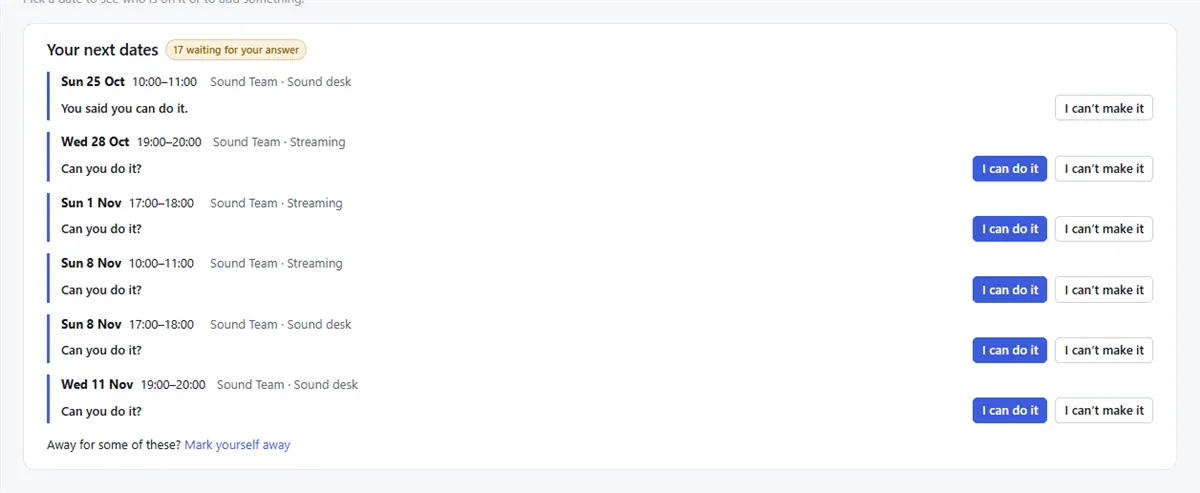
- Replying to dates. People on a date press I can do it or I can’t make it, in the app or from the reminder email without signing in. See Replying to a date.
- Roster emails. The schedule goes to each team on a day you choose, a reminder goes to the people on a date a few days before, and the team’s moderators are told when someone can’t make it. See Roster emails.
- Filling dates automatically. New dates get people put on them as they are added, and when someone can’t make a date, the next person in line is put on and asked. It is the Filling by itself card on a team’s Fill page.
- How often each person is on. Set each person to More often, Normal, Less often or Now and then, position by position. See How often.
The schedule email also tells each person which of the team’s dates they are marked away on, so a forgotten away day shows up before the date.
Note: Pro is bought for the whole organisation, not per person. One payment covers every team and everyone on it.
What it costs
Pro is A$1 a month per organisation, paid one to five years at a time (A$12 to A$60). Australian prices include GST. An administrator pays by card on Stripe’s page from the Plan tab; the steps are in Buying and renewing Pro. Full details are on the pricing page.
If Pro is not renewed, the organisation goes back to Free when the paid term ends and keeps everything: teams, people, dates and history. The Pro parts simply stop working until it is paid again.
Where Pro shows in the app
On a Free organisation the Pro parts are still visible, marked with a Pro tag and greyed out, so you can see what they would do. Under Your next dates, for example, people see their dates but the reply buttons are switched off.
Note: Roster emails only reach people who have accepted their invitation and set up an account. People added by name only, or still marked Not signed in on the People page, get no roster email.
Still stuck?
Email info@fairturns.com and say what you were trying to do.